
Start Here
Devant Overview
Get oriented to the main window, playback modes, media workflow, and backstage viewer.
Devant keeps the event project, active playlist, playback controls, and backstage information in one operator workspace. The three playback modes adjust that workspace for editing, rehearsal, or live recital operation.
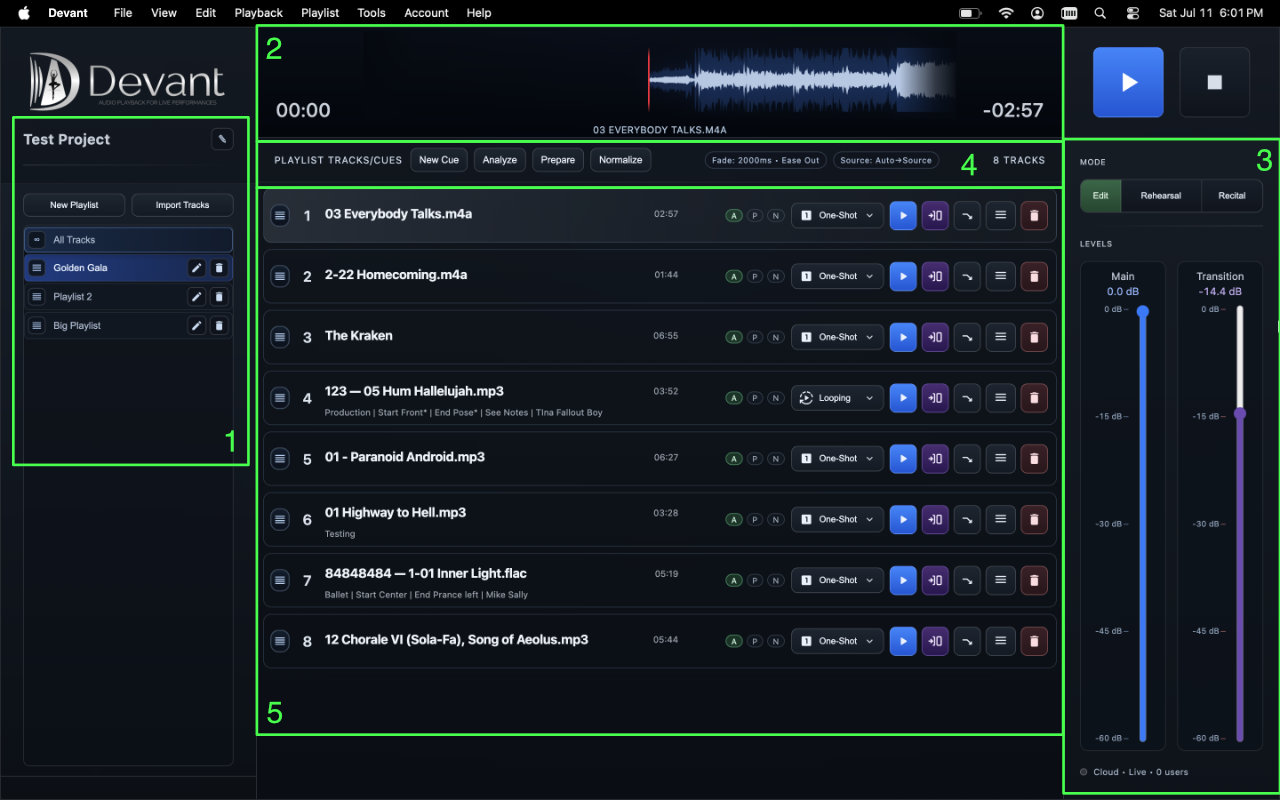
Main window
The main window keeps show preparation and playback visible without opening separate editing windows. The numbered overview image will identify these areas:
- Project sidebar Shows the current project and its playlists. Use New Playlist to add a running order and Import Tracks to add source audio.
- Waveform and transport Shows the selected track, elapsed and remaining time, and the primary Play and Stop controls.
- Mode and level controls Switches between Edit, Rehearsal, and Recital, and sets the main and transition playback levels.
- Playlist toolbar Provides New Cue, Analyze, Prepare, and Normalize actions for the active playlist.
- Track rows Represent the running order. Each row contains playback behavior, preparation status, direct playback controls, and an expandable metadata editor.
Playback modes
Select a mode from the Mode control on the right side of the main window. The active mode changes which preparation or performance controls are emphasized.
- Edit Build and adjust the running order, edit track information, review media readiness, choose playback behavior, and place named rehearsal start points.
- Rehearsal Practice from Track Top or a named checkpoint, adjust checkpoint positions while stopped, and use the waveform for direct navigation.
- Recital Run the active playlist with a focused live-performance view and recital readiness checks.
Media and backstage features
- Analyze Reads source-media properties and readiness information without changing the audio file.
- Prepare Creates playback-ready media used by Devant when the selected playback source allows it.
- Normalize Creates an optional loudness-adjusted playback file using the selected normalization strategy.
- Backstage Viewer Publishes a read-only current, next, and running-order view through Cloud or Local Offline Only hosting.