
Projects and Audio
Create, Open, and Save Projects
Organize a recital into projects and playlists that can be reopened when it is time to run the show.
A project holds the event context. Playlists hold the running order. Save deliberately as you make changes, and reopen the project before rehearsal or show day.
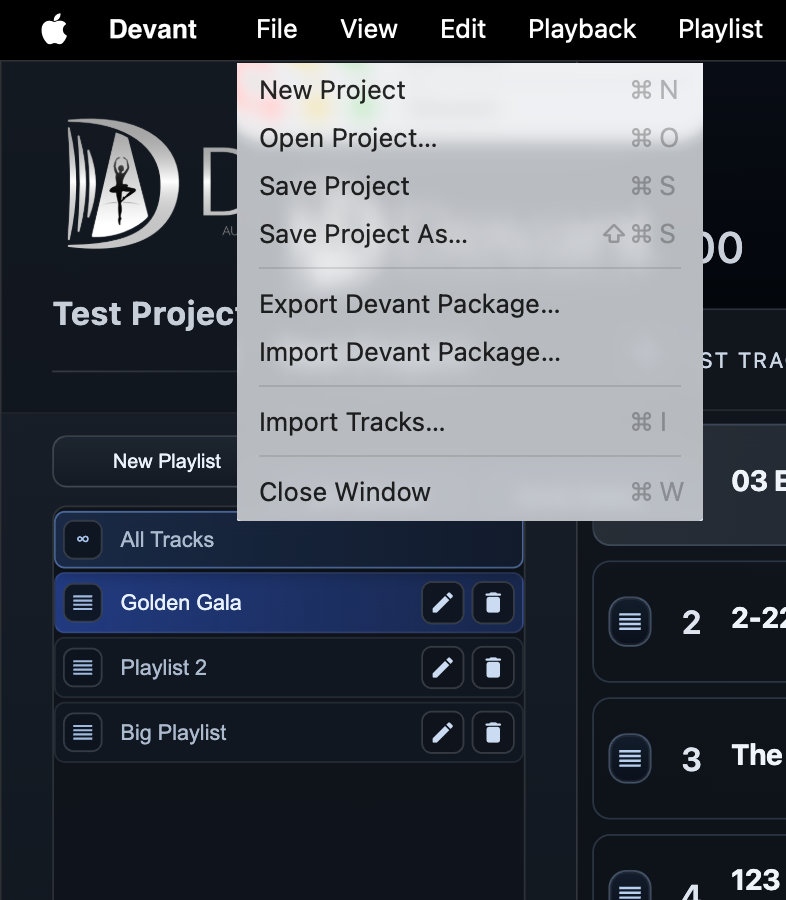
Projects and playlists
Use a project for the production or event. Use playlists inside the project for performance order, rehearsal order, or other distinct run plans.
Recommended workflow
- Open the File menu and select New Project.
- In the project sidebar, select New Playlist and enter a name for the running order.
- Select Import Tracks, choose the source audio files, and add them in performance order.
- Open the File menu and select Save Project As... to choose the project location and filename.
- For later changes, use File > Save Project. To return to the project, use File > Open Project....
Result: The saved project reopens with its playlists, track order, metadata, and playback settings intact.