
Projects and Audio
Create a Devant Package
Collect a project and any source audio currently available to Devant into a single local archive.
A saved .devant project remembers where its source audio lives. A .devantpkg package creates one local archive containing the project and the source audio files that Devant can access at export time.
Choose the right file
- Saved project (.devant) Use for normal work on the same computer. The project retains its playlists, metadata, and settings, and refers to the source audio at its existing file locations.
- Devant Package (.devantpkg) Creates one local archive containing the project and the source audio files that are available when you export it.
Create a package archive
- Save the project first with File > Save Project.
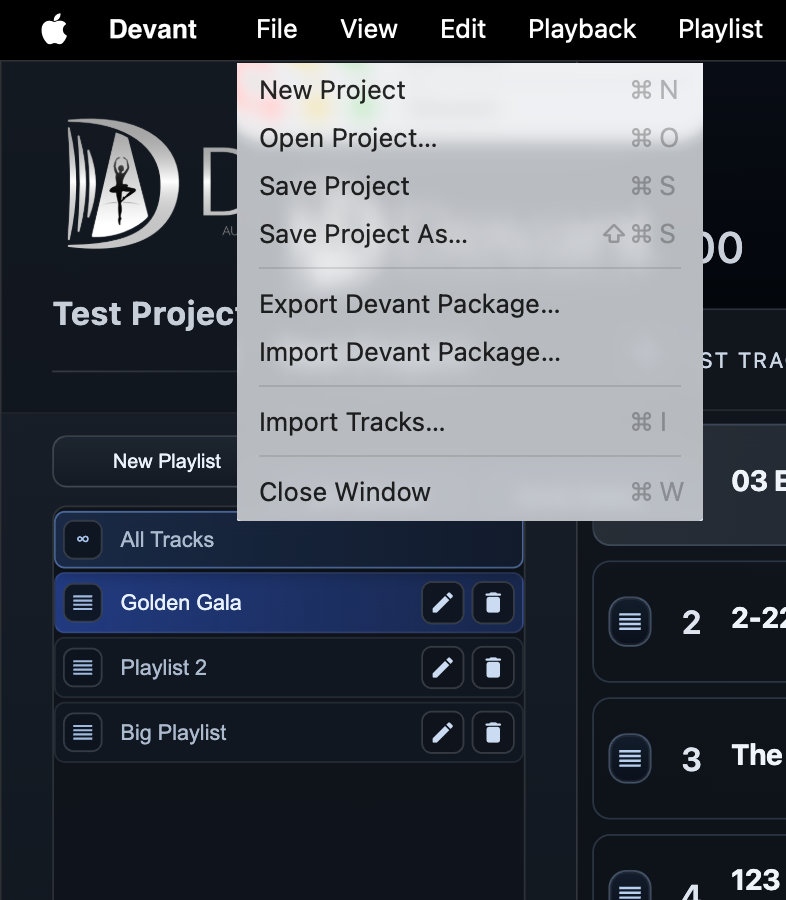
- Open the File menu and select Export Devant Package....
- Choose a safe destination and keep the
.devantpkgextension. - Wait for the export to finish before treating the package as an archive or backup copy.
Result: Devant creates one package file containing the project and its available source audio.
Open a package archive
- Open Devant, choose File > Import Devant Package..., and select the package.
- Choose a destination folder for the imported project. Devant creates a new folder there so it does not overwrite an existing import.
- Open the imported project, then run Analyze and Prepare as needed before relying on it for rehearsal or recital.
Result: Devant expands the package into a new local folder and opens the project. Source audio embedded in the package is available from that folder when it was present at export.
Verify before show day
- Confirm every required track is present and in the intended order.
- Prepare the imported media and review the selected playback source.
- Test representative tracks through the destination computer's event audio path.
- Keep the original package in a separate backup location until the event is complete.