
Playback
Set Track Playback Options
Choose what happens when each track reaches its end so the playlist behaves predictably in rehearsal and recital.
Each track has its own playback option. Use One-Shot for the normal stop-and-confirm workflow, Auto-Next only when the next item should begin immediately, and Looping only when a track is intended to repeat.
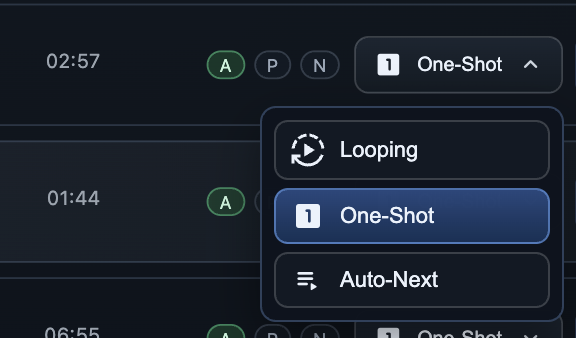
Choose the behavior for each track
In Edit mode, use the playback option button in the track row. The current selection appears in the button, such as One-Shot. Open it and select the behavior that matches the next action you expect after the track ends.
- One-Shot The default choice. The track plays once, then stops. Devant selects the next row when one is available, but does not start it automatically.
- Auto-Next When the track ends, Devant loads and starts the following track in the playlist. If there is no following track, playback stops.
- Looping When the track ends, Devant restarts that same track from the beginning. Stop playback when the repeated section is complete.
Rehearsal keeps control with the operator
Rehearsal mode does not automatically continue to another track or restart a looping track when it ends. This keeps practice predictable: use checkpoints, Track Top, or the transport controls to choose what happens next.
Before a live event
- Use One-Shot for any routine that should wait for an operator confirmation before the next item begins.
- Use Auto-Next only for planned, uninterrupted sequences, and test the transition through the actual event audio path.
- Use Looping only when the music is specifically intended to repeat, and make sure the operator knows how it will be stopped.
- Save the project after reviewing special playback options.