
Playback
Edit Mode
Build the running order, verify playback readiness, and make the track-level decisions that support a reliable rehearsal and show.
Edit mode is the project control center. Use it to shape the running order, add the context the operator and viewer need, choose intentional playback behavior, and create rehearsal start points.
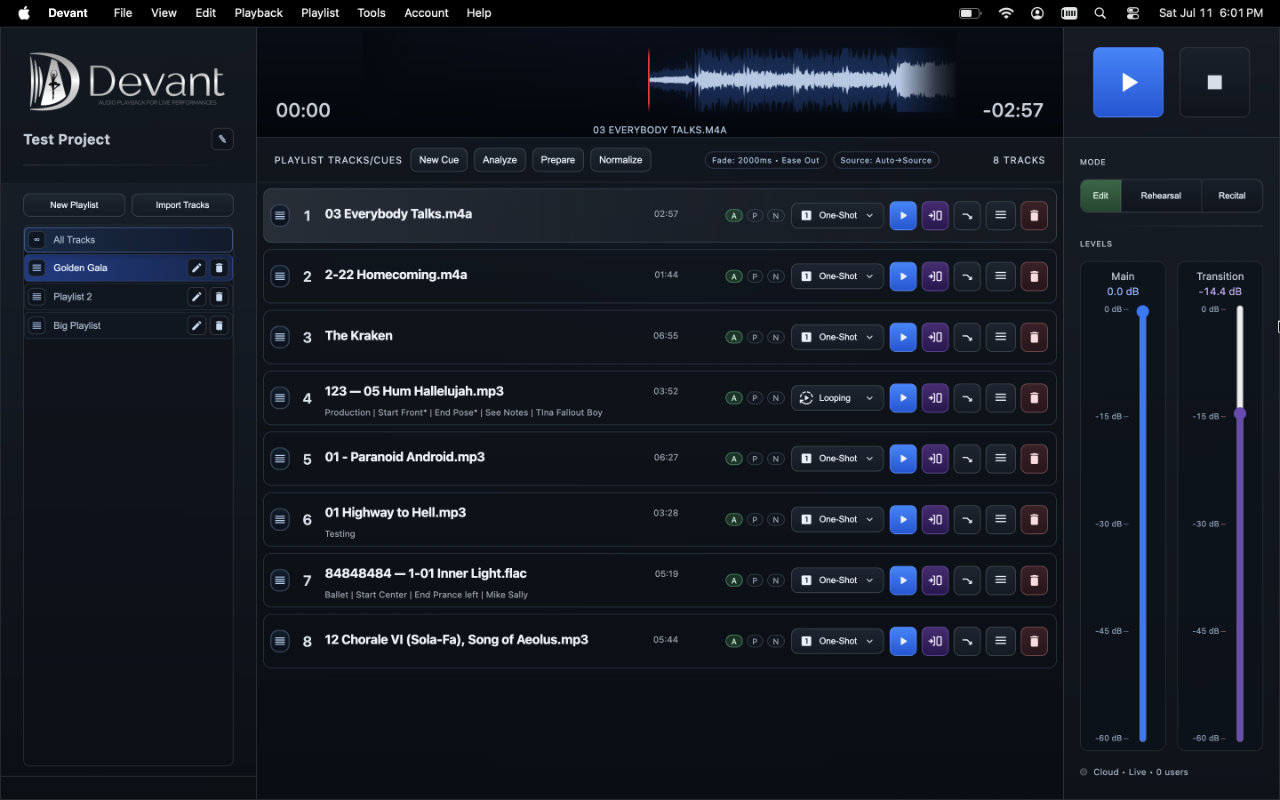
Use Edit mode for setup
Edit mode keeps the tools for arranging tracks, reviewing media, and updating track details beside the running order. It is the right place to make deliberate changes before people are waiting on playback.
The mode is more than a list editor. It is where you establish what each track means in the production, how it should behave when it is played, and what information the backstage team should see.
- Running order Add, reorder, and remove tracks or cues so the playlist reflects the intended event sequence.
- Track metadata Use the track-row drawer to add a clear title, performer or class context, viewer note, and other concise show-facing information.
- Playback behavior Review each row's playback options and transition behavior before rehearsal so live operation follows the intended plan.
- Media readiness Use Analyze, Prepare, and Normalize intentionally, then confirm the required prepared media and playback source are available.
- Rehearsal checkpoints Identify the tracks that need rehearsal start points. Create and label those optional start points in Rehearsal mode; they never create an automatic ending.
Plan rehearsal checkpoints
Checkpoints belong to the selected track and are intended for rehearsal. They let a teacher or operator start a section quickly, then let the track keep playing until someone stops it. Create them from Rehearsal mode after the track order, title, and playback behavior are ready.
Before leaving Edit mode
- Confirm track order and names.
- Review special playback behavior.
- Confirm the labels and positions of any rehearsal checkpoints you created.
- Confirm viewer-facing notes are concise and current when the event uses Backstage Viewer.
- Save the project.