
Devant Rehearsal for iPhone and iPad
Use the Apple Watch Companion
Control the active iPhone rehearsal from Apple Watch with focused transport, countdown, and checkpoint controls.
The Apple Watch companion controls the rehearsal that is active on the paired iPhone. It does not play a separate audio file or choose a separate output; it gives the instructor immediate control without reaching for the phone.
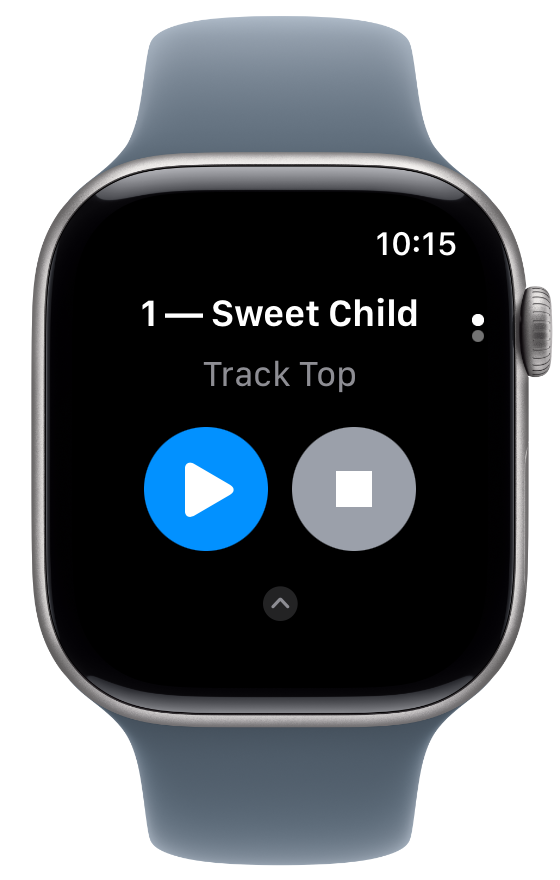
Before using Watch controls
- Install the Devant Rehearsal Apple Watch companion on a Watch paired with the iPhone running the rehearsal.
- Open a track in Devant Rehearsal on iPhone and keep the phone available for audio playback.
- Confirm that the Watch displays the active track name before relying on it during class.
Use the Now Playing page
- Play or Pause Starts or pauses the active iPhone rehearsal. When a delay is selected, Play starts or restarts the iPhone countdown and shows its remaining time.
- Stop or Return Stops playback and returns to the selected checkpoint when one is active. A second stop from that point returns to Track Top. While counting down, it cancels the countdown.
- Active checkpoint Shows the iPhone rehearsal's current return point so you can confirm where Stop will return.
Choose a playback delay
- On Now Playing, select the timer icon beside the track and checkpoint details.
- Choose No countdown, 5 seconds, 10 seconds, or 20 seconds.
- The timer shows the selected delay. Select Play when you are ready to start the countdown.
Result: The paired iPhone uses the selected session delay and both devices show an active countdown as it runs.
Choose a checkpoint
- Swipe up from Now Playing, or use the Digital Crown, to open the checkpoint page.
- Review the ordered checkpoint list under the sticky track name.
- Select a checkpoint to make it the iPhone rehearsal's current return point and move playback to that time.
Result: The iPhone and Watch update to show the selected checkpoint as the current return point.
If the Watch is waiting for iPhone
Open Devant Rehearsal on the paired iPhone and confirm that a rehearsal track is selected. The Watch companion needs the iPhone app to provide the current track, checkpoint, and playback state.