
Backstage Viewer
Use Viewer on a Signage Display
Set up a large backstage display that keeps current, next, and running-order information readable from a distance.
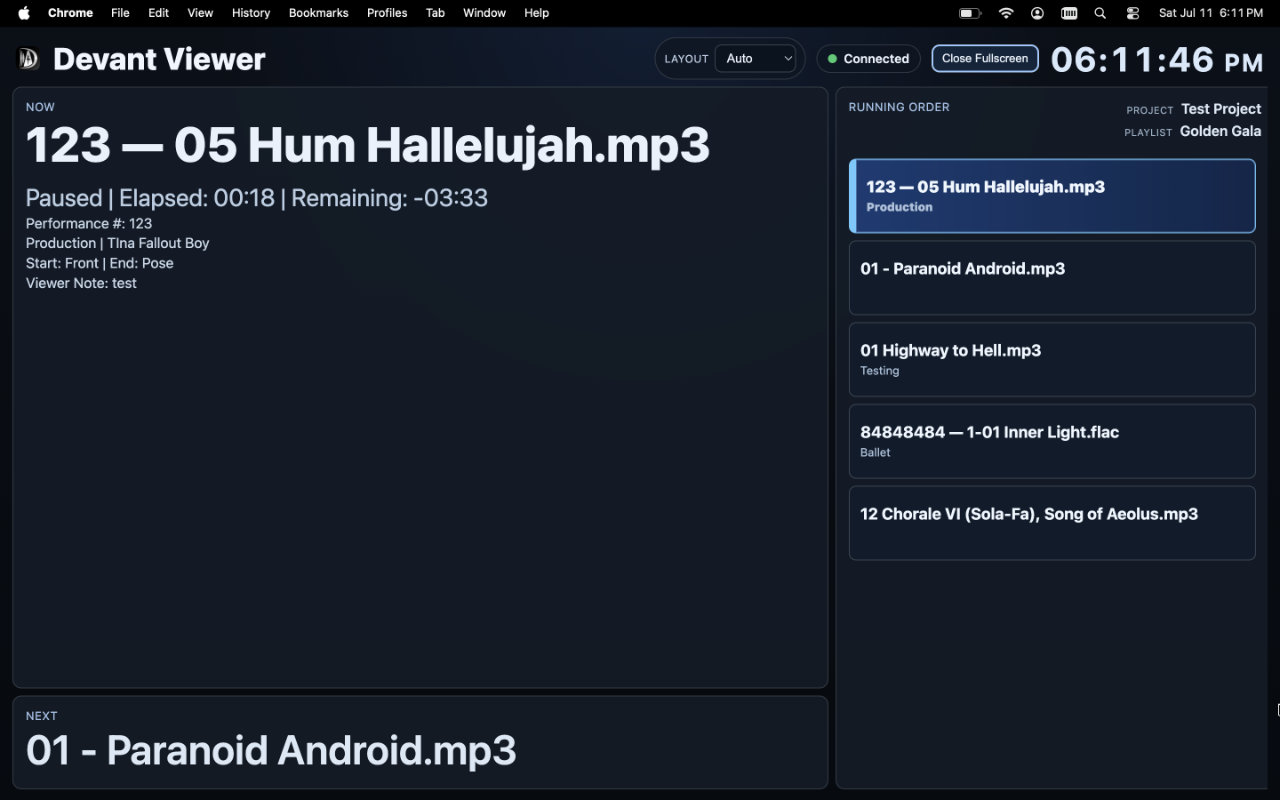
Use the signage layout for televisions, monitors, and larger landscape displays backstage. It emphasizes the current item, the next item, a clock, and the remaining running order without adding playback controls.
Set up the display
- Open the shared viewer link or visit viewer.devant.app on the backstage display.
- Enter the room code, display name, and room PIN when required, then select Join Room.
- Leave Layout set to Auto on a suitable large landscape display, or select Signage when you need to override the automatic choice.
- Select Enter Fullscreen when the browser supports it and the display will remain dedicated to the viewer.
Result: The display presents the signage view while the room remains live, with the current track at the top of the running order.
Use it during an event
- Keep the display powered and connected to the intended network.
- Position it where staff can read the current and next information without obstructing the performance area.
- Treat the display as show information only; the operator controls playback from Devant.