
Playback
Rehearsal Mode
Teach and practice a specific section from a consistent start point while keeping the playlist and track waveform in view.
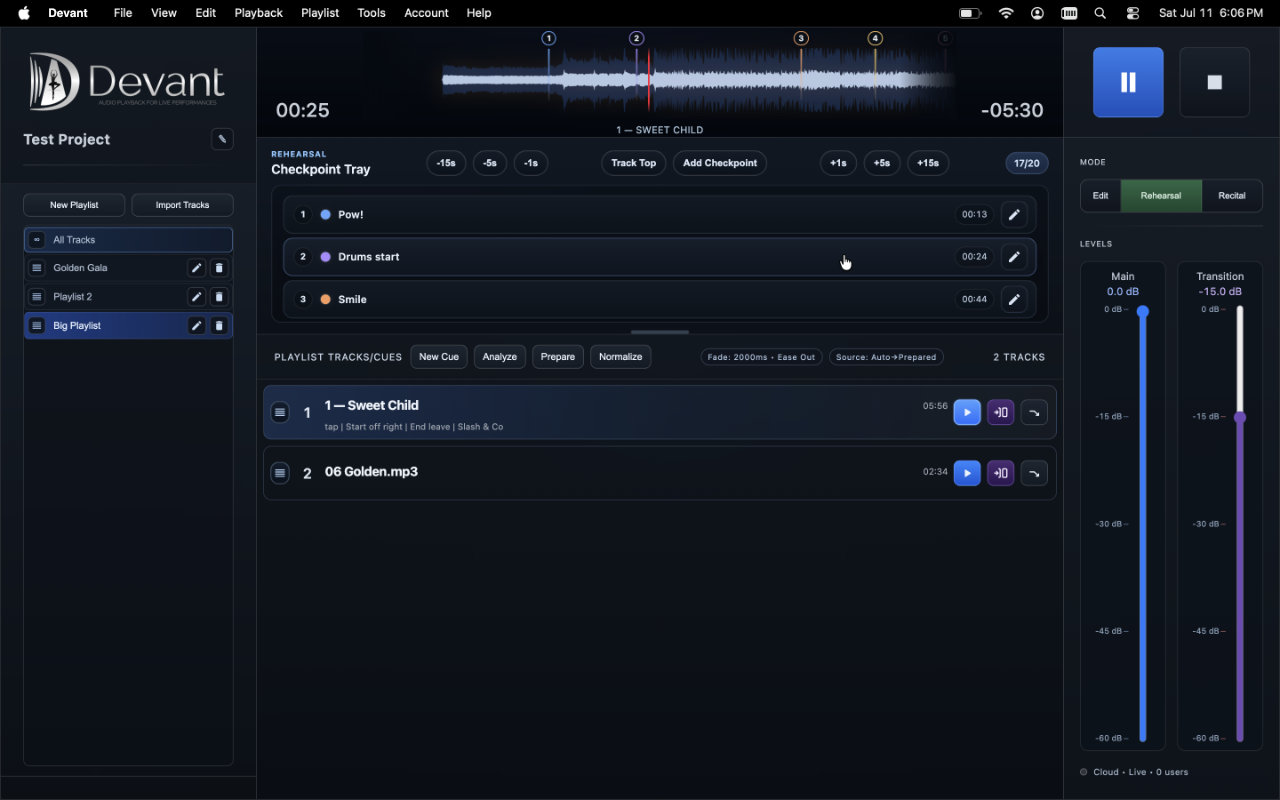
Use checkpoints as reusable start anchors while teaching a track. Rehearsal gives instructors quick seek controls, a checkpoint tray, and waveform handles without turning a checkpoint into an automatic stop marker.
Choose a Track for Rehearsal
- Select an audio track from the active playlist, then select Rehearsal in the mode control before beginning a class or individual pass.
- Use Track Top to begin at 00:00, or use the -15s, -5s, -1s, +1s, +5s, and +15s controls to place the rehearsal position precisely.
- Use the main transport to play and pause while you teach. The checkpoint tray remains tied to the selected playlist track.
Add a checkpoint at the current position
A checkpoint means start here and keep playing. It is not an automatic stop marker, so an instructor can pause the track when the class has completed the section. Each playlist audio track supports up to 20 checkpoints, and Devant prevents another checkpoint within one second of an existing one.
- Place the rehearsal position at the section's intended starting point.
- Select Add Checkpoint. A new checkpoint is added to the tray and selected on the waveform.
- Use the checkpoint's edit control to set a short Name, an exact Time, and a distinguishing Color. The index is automatic and stays separate from the editable name.
Use and adjust checkpoints
- Select a checkpoint row to return the class to its start point and make it the current rehearsal anchor.
- Use the visible waveform handle to drag a checkpoint only while the track is stopped. The marker line itself does not move the track or checkpoint.
- Edit the time when an exact value is more useful than dragging. Checkpoints automatically reorder by time, and their displayed indexes update to match.
- Keep labels short and recognizable, such as a section name, dancer entrance, or repeat instruction.
Move back to the track top
Use Track Top whenever the next pass should start from 00:00 rather than a checkpoint. Checkpoints are saved with the playlist entry, so the teaching plan remains available when you return to that project and playlist.